Contents
- What changed in the Connecticut Data Privacy Act on July 1, 2026?
- Does the Connecticut privacy law apply to your business now?
- What do the CTDPA amendments 2026 mean if you get it wrong?
- What to update in HubSpot: a ten-step check
- What changed again on October 1, 2026, under SB 4?
- Does HubSpot make you compliant with the Connecticut Data Privacy Act?
- Where does your marketing team's job stop and your lawyer's start?
- The law changed. Your systems need to keep up
- Questions
Last year, plenty of mid-sized companies could read about the Connecticut Data Privacy Act (CTDPA), check that they held data on fewer than 100,000 Connecticut residents, and move on. That stopped working on July 1, 2026. The new Connecticut privacy law reaches far more businesses. It also counts things marketing teams do every day, such as running ad pixels or swapping lists with a partner brand.
This is a practical guide for the people who run the CRM, the forms and the cookie banner. It covers what changed, who it now applies to, and the settings to check in HubSpot. I'm not a lawyer, and this isn't legal advice. Read the amended statute and a law-firm summary, and confirm what applies to you with your own counsel.
What changed in the Connecticut Data Privacy Act on July 1, 2026?
Senate Bill 1295 (Public Act 25-113, passed in 2025) did three things. It widened who the Connecticut Data Privacy Act applies to, widened what counts as sensitive data, and added new rights for consumers along with new duties for businesses. It's one of several amendments since the law passed in 2022, and for marketing teams it's the one that matters most.
| Area | Before July 1, 2026 | From July 1, 2026 |
|---|---|---|
| Who it covers | 100,000+ Connecticut consumers, or 25,000+ if more than 25% of revenue came from selling data | 35,000+ consumers, or any business that processes sensitive data or sells personal data |
| Sensitive data | The original categories, such as health data | Adds financial account logins and card numbers, plus government ID numbers |
| Minors | Narrower teen protections | Extended to older teens, with no targeted ads or sales where you know or willfully ignore their age |
| Consumer rights | Existing rights | Adds access to the inferences you've drawn about someone, and a list of the third parties you sold their data to |
| Privacy notice | Standard disclosures | Must say whether you use personal data to train LLMs |
| Cure period | Guaranteed 60 days, which ended on December 31, 2024 | No guaranteed cure. Any cure is at the Attorney General's discretion |
The law also gives people new rights over profiling decisions that have legal or similarly significant effects. Most marketing teams won't be making those decisions, but if you score leads to decide who gets an offer or a price, ask your lawyer whether that counts.
Does the Connecticut privacy law apply to your business now?
If you control or process personal data on at least 35,000 Connecticut consumers, process any sensitive data, or sell any personal data, then yes. WilmerHale lists the triggers in exactly those three parts. Snell & Wilmer calls the last two no-threshold triggers.
That changes how you should read any list of data privacy laws by state. The 35,000 figure gets the headlines, but the two triggers with no number attached are what catch marketing teams.
There's one thing that works in the other direction. The law protects people acting as individual consumers, not people acting in an employment or business-to-business context. For a B2B team, that makes the first question "which of our contacts are consumers at all?" Your lawyer answers it, and the answer changes how much you need to fix.
What counts as "selling" data for a marketing team?
Selling means sharing personal data for money or anything else of value. It doesn't have to be cash. Foley's summary gives everyday examples: ad-network cookies, tracking pixels on a checkout page, letting a vendor train its AI on your data, and swapping lists with a partner brand.
A lot of marketing teams don't think of themselves as selling data. Plenty of them also run a Meta or LinkedIn pixel on their site. This is the question to put to your lawyer first.
What counts as sensitive data now?
The definition now includes financial account numbers, logins and card numbers that could open an account, and government ID numbers such as Social Security, passport and driver's license numbers. Those sit alongside the categories already covered, such as health data. Processing sensitive data now requires consent and must be reasonably necessary, and you need consent before you sell it.
For a marketing team, the risk is usually a form field. Think of a "Tell us about your condition" box on a clinic's inquiry form, or a field asking for a license number "just in case".
What do the CTDPA amendments 2026 mean if you get it wrong?
You can't count on time to fix a problem before the Attorney General acts. The guaranteed 60-day cure period ended in 2024, and the 2026 amendments drop it from the law, so any chance to cure a violation is now at the Attorney General's discretion. Penalties can reach $5,000 per willful violation.
Enforcement is already happening. The Attorney General's latest report describes dozens of notices of violations and warning letters, and the office's first resolved enforcement action under the CTDPA. Its areas of focus include minors' data, geolocation, data brokers and AI products.
Kelley Drye's write-up of that report adds two details that matter to marketers. The office is testing opt-out signals with technologists to see whether businesses actually honor them. It also runs sweeps of cookie banners looking for "dark patterns", where opting out is made harder than opting in.
What to update in HubSpot: a ten-step check
This is where the work happens. Your lawyer tells you what the law requires, and these are the places in HubSpot where that requirement either works or doesn't. The settings below are in HubSpot's own documentation, linked where they come up. Check your subscription tier as you go, because some features are Enterprise only.
1. Work out which contacts are consumers, and who's a minor
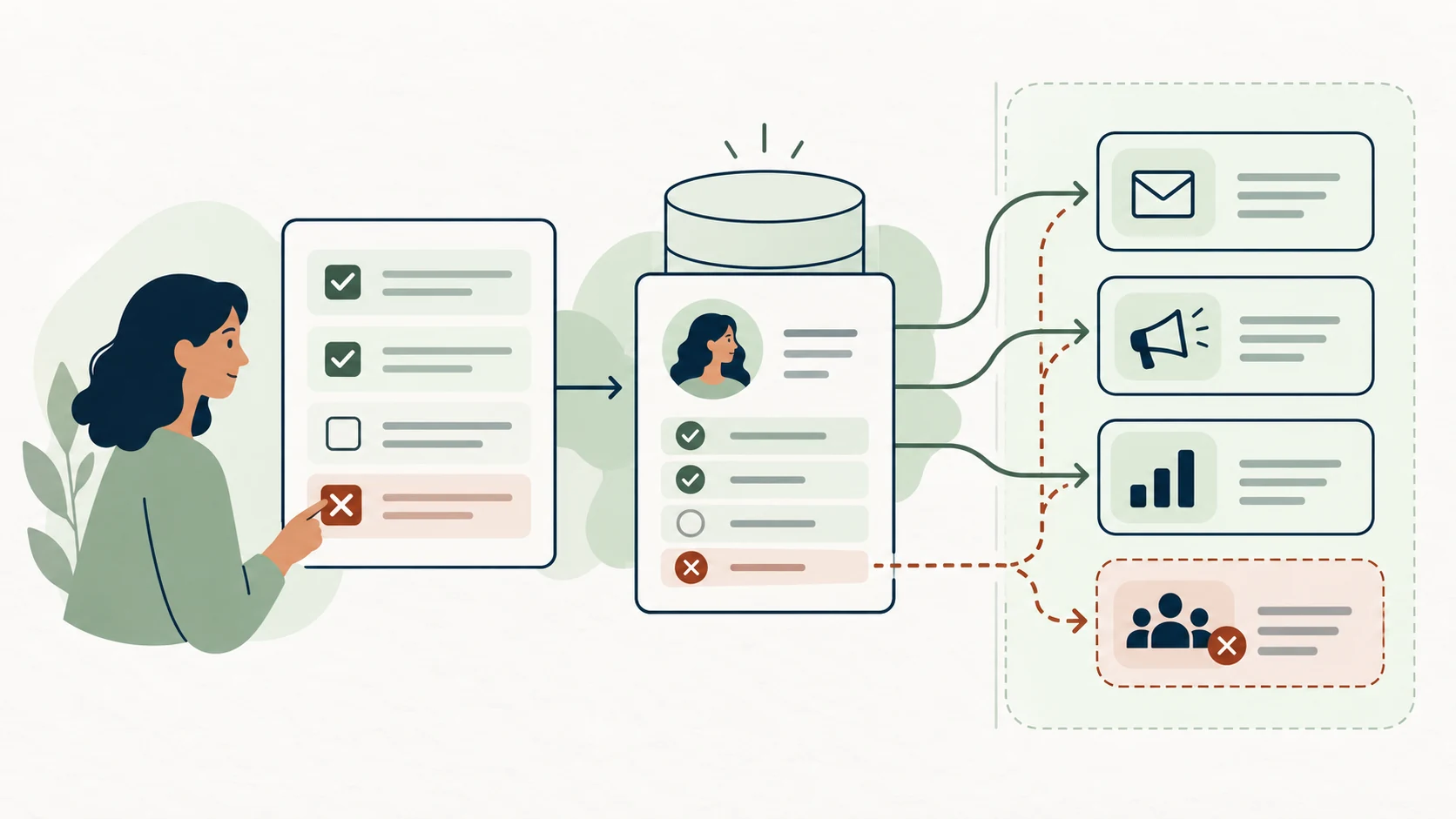
Create a property that separates consumers from business contacts, because the law treats them differently. Your lawyer decides where the line falls. My job, and yours, is making sure the CRM can tell the difference and that segments and workflows respect it.
While you're there, check whether you know any contact is 13 to 17. If you know, or willfully ignore, that someone is in that age range, you can't target ads at them or sell their data, regardless of consent. Most B2B teams can skip this. Consumer brands with a young audience should check their audience lists and lookalike seeds.
2. Turn on data privacy settings
The data privacy settings switch lives under Settings > Privacy & Consent. Turning it on does several things at once: it switches on the cookie consent banner, adds a privacy section to new forms, and adds unsubscribe links to sales and sequence emails. It also stops email tracking for contacts without a legal basis.
Teams that set this up for GDPR may already have it on. Teams that only market in the US may never have turned it on.
3. Fix your consent properties
You need one consent property per channel, each with a source and a date. No workflow or import should set any of them to "true" on someone's behalf.
That last rule comes from a recent audit. At a multi-brand B2B client, an import workflow was setting marketing consent to "true" on every imported contact, whether or not that person had ever agreed to anything. The consent field looked full, but it didn't mean anything. SMS had the same problem in a different shape: a current opt-in property, three older duplicates nobody had retired, and a checkbox on the store's forms that didn't map to anything in HubSpot.
The result was that nobody could say who they were allowed to message. Thousands of contacts couldn't be emailed but still counted against the paid contact tier. Sending by brand relied on static "do not send" lists, which failed as soon as someone belonged to two brands. We turned off the forced-consent workflow, kept one consent property per channel, and built segments on actual consent.
Once the properties are right, check that subscription types and marketing contact status match what people actually agreed to.
4. Respond to Global Privacy Control, and check what your banner actually controls
Since January 1, 2025, businesses covered by the CTDPA must treat browser privacy signals such as Global Privacy Control as an opt-out of sales and targeted advertising. That still applies when the signal conflicts with a choice the person made earlier. If the law has only just started applying to you, this rule applies to you too.
HubSpot's cookie banner has a GPC setting called "Respond to Global Privacy Control signaling". With it on, visitors sending the signal aren't tracked by non-essential HubSpot cookies. If cookie blocking is also on, non-essential third-party cookies are blocked as well.
The toggle is only as good as what the banner can reach. When I audited one European client's website, I found two competing cookie setups running at once, and the Facebook pixel installed twice under two different Meta IDs. Microsoft Clarity was duplicated, and Hotjar was loading outside the tag manager, where the banner couldn't control it. The banner was real. It just wasn't connected to most of what was collecting data. Since the Attorney General is testing exactly this, check your site in a browser with GPC switched on rather than trusting the toggle.
5. Cut the forms that collect what you don't need
Every form is a place where sensitive data can slip in. The fewer forms you have, the easier it is to know what you collect.
We saw how quickly forms pile up with Ecoplex, an Irish solar installer. Their lead handling had grown to 19 forms and 28 automations. We rebuilt it around 3 forms and 3 automations, mainly to stop sales calls to leads whose data was wrong. That wasn't a privacy project, but three forms are far easier to audit than nineteen.
The quieter problem is collecting the same data more than once. One client of mine has three people filling in three forms with the same personal details just to complete one task. Every repeat is another copy of someone's data that you have to keep accurate, find and delete.
So list every live form, every field on it, the reason for each field, and where that field ends up. Then delete what nobody uses.
6. Decide on sensitive data properties before you create them
HubSpot can mark a property as Sensitive Data or Highly Sensitive Data, which limits where it appears and encrypts the most sensitive values. It's Enterprise only, and a Super Admin turns it on under Settings > Security > Sensitive Data.
Here's the trap: the sensitivity setting is chosen when a property is created, and it can't be changed afterwards. Sensitive properties also can't be used in some tools, including personalization tokens, chatbots and playbooks. Decide which fields count as sensitive before you build them, not after a campaign depends on them.
7. Map every place data leaves HubSpot
People can now ask for a list of the third parties you sold their data to. You can't answer that without a map. These are the places I find data leaving most often:
- Pixels and tracking scripts added by whoever ran the last campaign, often outside the tag manager and outside the banner's control.
- Automations. Every Zapier zap or integration copies data somewhere. One client had 28 automations built by different agencies, and nobody had a list of where they all sent things.
- Messaging and sales tools synced to HubSpot.
- Reps' own lists. When reps can't send to a segment from the CRM, contacts end up in Outlook, spreadsheets and phones, where no opt-out reaches them.
- Old lists, such as Mailchimp-era exports nobody has reviewed.
- Enrichment tools. I use Apollo and HubSpot's AI enrichment myself from time to time. Remember that enrichment adds data to a record that the person never gave you directly.
The one mistake I'd most want you to avoid is buying a tool to fix what is really a data problem. A consent platform sitting on two competing cookie setups and a pixel installed twice still leaks. It just looks compliant. Map what you collect, where it goes and who can see it first. Then decide which tool you need, if any.
8. Test every opt-out path end to end
Submit a test opt-out through every channel and confirm it lands in HubSpot and in every connected tool. For SMS, the test I always run is this: when someone opts out in the texting tool, does the opt-out actually write back to HubSpot? It's the test most likely to fail.
9. Build a process for access and deletion requests
HubSpot's permanent delete removes a contact along with their email tracking, calls, form submissions and other activity. It works on one record at a time, and the purge can take up to 30 days.
That's fine for the occasional request. It isn't a process. Decide who receives requests, who checks the person's identity, and who handles the data held outside HubSpot (the map from step 7). Access requests now cover the inferences you've drawn about someone, such as lead scores or predicted segments.
When I worked in-house at Mission Cloud, a California company, we received one of these requests. We decided to comply, not because we had to, but because it was the right thing to do. Having a process means that kind of decision doesn't turn into a scramble.
10. Update your privacy notice with your lawyer
The notice now has to say whether you use personal data to train large language models. It also has to cover profiling and targeted advertising, and have a homepage link containing the word "privacy". Your lawyer writes the wording. Your job is to make sure it describes what your systems actually do, which steps 3 to 9 tell you.
What changed again on October 1, 2026, under SB 4?
Senate Bill 4 (Public Act 26-64, signed May 27, 2026) made further changes to the CTDPA from October 1, 2026. The headline is a geolocation sale ban: you can no longer sell a consumer's precise geolocation data. It also expands deletion rights to certain public-source profile information and inferences. Data brokers must register with the state from January 1, 2027.
There's also a consent change that's easy to miss. You used to need fresh consent only for a "material" new use of someone's data. Now you need it for any new purpose that isn't reasonably necessary to, or compatible with, the purpose you told them about. So if you want to feed your newsletter list into a new enrichment or AI tool, check with your lawyer first.
If you're worried that running a CRM makes you a data broker, the Proskauer summary says ordinary first-party CRM or loyalty use, on its own, is not data brokerage.
Does HubSpot make you compliant with the Connecticut Data Privacy Act?
No tool makes you compliant on its own. HubSpot gives you the settings covered above, and whether you comply depends on how you set them up, what your forms and integrations actually do, and the policies your lawyer signs off.
The settings matter, but a GPC toggle doesn't help if a pixel loading outside the tag manager fires anyway. Compliance comes from the CRM and the decisions behind it working together.
Where does your marketing team's job stop and your lawyer's start?
Your lawyer decides what the law requires. Your systems have to match that decision, and someone has to prove they do. Trouble starts when each side assumes the other has it covered.
The lawyer decides whether you're in scope, which contacts count as consumers, what the privacy notice says, how long you keep data, and what consent wording is valid. My job is making the system match those decisions and proving it does. That means mapping the data, building the consent properties and opt-out paths, cleaning up pixels and integrations, and testing that an opt-out works end to end. I'll tell a client when something looks risky, but I'll always send them to a lawyer for the answer.
Every engagement starts with discovery, where "properties, workflows, forms, tracking, and the handoff to sales are inventoried." That's the same list your lawyer will need before they can give advice. If that's your gap, our work on connected systems is where we'd start, with your counsel deciding what the law requires. You can read more about our diagnosis-first approach too.
The law changed. Your systems need to keep up
Most of this comes down to one thing: your systems have to do what your privacy notice says they do. The law changed in July and again in October. Whether you're ready mostly depends on settings, forms and integrations someone set up years ago.
If you're not sure what your stack is doing with personal data, book a 30-minute call with Joshua McSorley. You'll leave knowing whether it's a project or an ongoing partnership, and roughly what it costs. Questions about what the law requires still go to your lawyer.
This article is general information for marketing teams, not legal advice. Joshua McSorley is not a lawyer. Laws and guidance change. Confirm how the Connecticut Data Privacy Act applies to your business with qualified counsel. Last reviewed: October 2026.